

CI/CD Pipeline Guide: How to Automate Software Delivery
Releasing a software update sounds simple: write the code, test it, and put it into production. In practice, every release can involve code reviews, builds, testing, staging, approvals, deployment, and monitoring.
When these steps depend heavily on manual work, releases can become slower and more difficult to manage.
A CI/CD pipeline turns many of these repetitive activities into an automated workflow. It helps development teams build, test, and release software in a more consistent way while giving businesses a clearer path from a code change to a production release.
For SaaS platforms, custom applications, and software products that require frequent updates, CI/CD can become an important part of the development and delivery process.
What Is a CI/CD Pipeline?
A CI/CD pipeline is an automated workflow that helps move software changes from development through testing and, depending on the setup, into production.
CI stands for Continuous Integration. It focuses on regularly integrating code changes and automatically checking them through builds and tests.
CD can mean Continuous Delivery or Continuous Deployment. Continuous Delivery prepares validated software for release, typically with a human approval step. Continuous Deployment goes further by automatically releasing changes when predefined conditions are met.
A typical pipeline might look like:
The exact stages can vary depending on the application and the team’s development process.
How Does a CI/CD Pipeline Work?
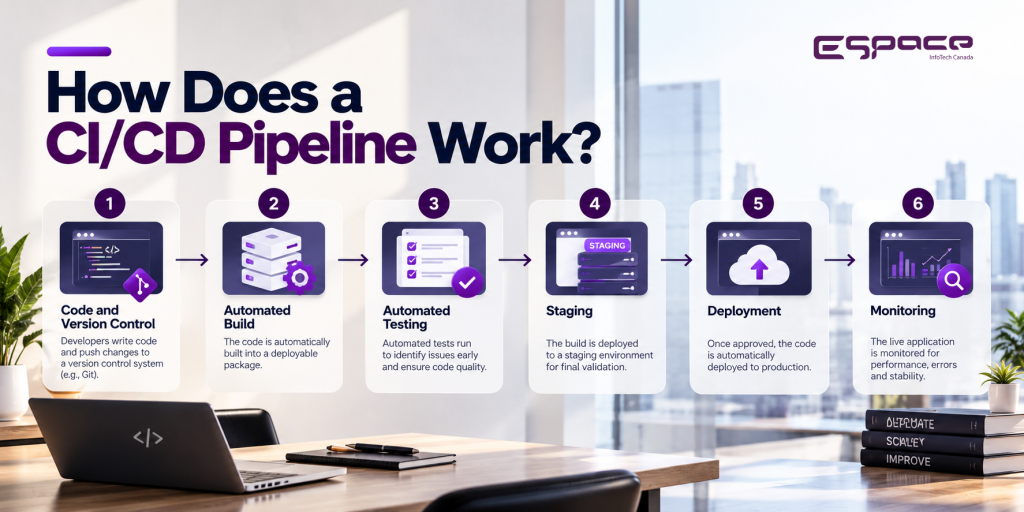
A CI/CD pipeline usually starts when a developer commits a change to a version control repository. From there, automated processes can validate and move the change through different stages.
1. Code and Version Control
Developers commit changes to a shared repository such as GitHub or GitLab.
Version control makes it possible to review changes, track development history, collaborate with other developers, and return to an earlier version when necessary.
2. Automated Build
The pipeline retrieves the code and creates a deployable build.
This stage may install dependencies, compile code, run basic checks, and generate the application artifact required for later stages.
If the build fails, the pipeline stops before the change moves forward.
3. Automated Testing
Testing is one of the most valuable parts of CI/CD.
Depending on the application, the pipeline may run:
- Unit tests
- Integration tests
- API tests
- Functional tests
- Security checks
- Performance tests
Automated testing helps teams identify problems before a release reaches production. AWS describes CI/CD pipelines as workflows that can automate testing for areas such as functionality, integrations, security, and performance.
4. Staging
After passing the required checks, the application can be deployed to a staging environment.
Staging provides a production-like environment where teams can perform additional validation without exposing unfinished changes to real users.
5. Deployment
Once the release meets the required conditions, it can move into production.
Some organizations require manual approval before deployment. Others use automated rules to release changes once all checks have passed.
6. Monitoring
Deployment is not the end of the process.
The application should continue to be monitored for errors, performance issues, infrastructure problems, and unexpected behavior.
This creates a feedback loop that helps development teams respond to problems and improve future releases.
What Are the Benefits of a CI/CD Pipeline?

A CI/CD pipeline is useful because it reduces repetitive manual work and creates a more consistent software delivery process.
Faster Releases
Automated builds, tests, and deployments can reduce the time required to release changes.
Instead of waiting for a manual release process, teams can move validated changes through a predefined workflow.
Earlier Problem Detection
Automated checks can identify problems closer to the point where code is introduced.
That gives developers an opportunity to fix issues before they become production problems.
More Consistent Deployments
A documented and automated deployment process reduces the number of steps that depend on individual team members.
The same workflow can be repeated across development, staging, and production environments.
Better Developer Productivity
Developers do not need to spend as much time repeating routine deployment tasks.
They can focus more of their time on product improvements, new features, and solving technical problems.
Easier Release Management
A pipeline gives teams visibility into where a change is within the release process and where a failure occurred.
This can make troubleshooting more structured and easier to manage.
CI/CD Pipeline vs Manual Deployment
| Factor | Manual Deployment | CI/CD Pipeline |
|---|---|---|
| Build | Manual or partially automated | Automated |
| Testing | Can vary by release | Repeatable automated checks |
| Deployment | Multiple manual steps | Defined workflow |
| Release speed | Usually slower | Faster when properly configured |
| Consistency | Depends on the team | Process-driven |
| Error handling | Often manual | Can include automated checks and rollback |
| Monitoring | May be separate | Can be connected to the delivery workflow |
CI/CD does not remove the need for developers, QA engineers, or DevOps specialists. It gives those teams a more structured way to work together.
What Tools Are Used in CI/CD?
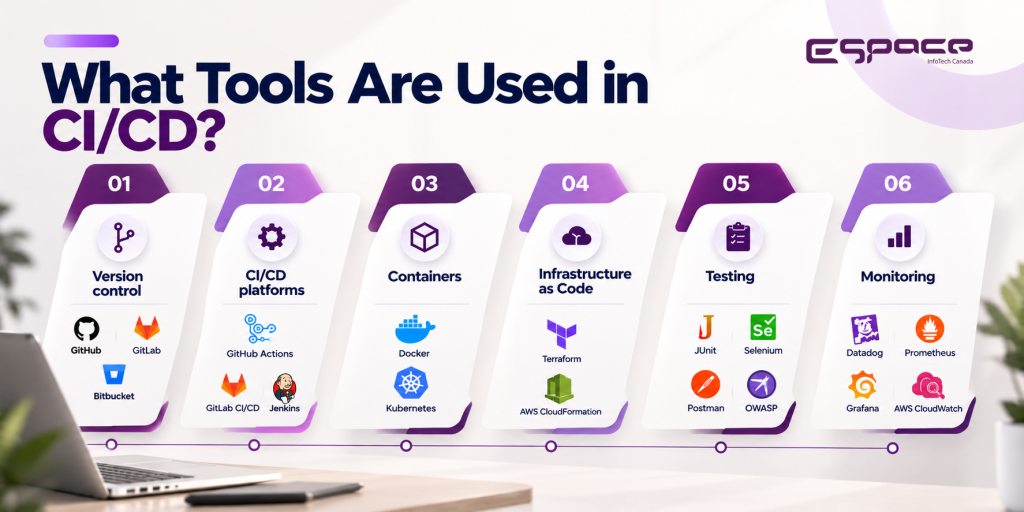
There is no single CI/CD tool that fits every business.
The right technology depends on the application’s architecture, programming languages, cloud environment, testing requirements, security needs, and existing development workflow.
Common tools and technologies include:
Version control: GitHub, GitLab, Bitbucket
CI/CD platforms: GitHub Actions, GitLab CI/CD, Jenkins
Containers: Docker, Kubernetes
Infrastructure as Code: Terraform, AWS CloudFormation
Testing: Unit, integration, API, security, and end-to-end testing frameworks
Monitoring: Cloud and application monitoring platforms
For example, GitHub Actions can automate build, test, and deployment workflows directly from a repository. Workflows can be triggered by events such as code pushes and pull requests.
The goal should not be to use the largest possible collection of DevOps tools.
The goal is to create a delivery process that is reliable, understandable, secure, and maintainable.
How Does CI/CD Support DevOps?
CI/CD is closely connected with DevOps because it brings development, testing, deployment, and operations into a more continuous workflow.
Without automation, developers may finish a feature and then depend on another team to manually build, test, and deploy it.
With CI/CD, many of these steps can happen automatically after code changes are submitted.
This becomes particularly valuable for SaaS products and applications that release updates frequently.
A development team can establish a repeatable path:
That creates a tighter feedback loop between development and production.
How Does CI/CD Improve Software Security?
Security should not be treated as something that happens only before production deployment.
Security checks can be incorporated directly into the pipeline.
Depending on the project, these may include:
- Static code analysis
- Dependency scanning
- Secret detection
- Vulnerability scanning
- Container security checks
- Security testing
- Compliance-related checks
This approach is often associated with DevSecOps, where security becomes part of the software development and delivery lifecycle.
For applications handling sensitive customer, financial, or business information, integrating security checks into the delivery process can provide an additional layer of protection.
What Are the Best Practices for Building a CI/CD Pipeline?

A good CI/CD pipeline should fit the application rather than being implemented simply because automation is popular.
Keep Changes Small
Smaller changes are generally easier to review, test, deploy, and roll back.
Automate Testing Early
Do not wait until the final release stage to discover basic problems. Run appropriate automated tests as early as practical.
Separate Environments
Development, testing, staging, and production should have clearly defined purposes and controlled access.
Protect Credentials
API keys, passwords, tokens, and deployment credentials should never be exposed directly in source code.
Make Deployment Repeatable
The deployment process should be predictable and documented rather than dependent on someone remembering a series of manual commands.
Plan for Rollback
A production deployment can still fail even after testing. A rollback strategy gives the team a controlled way to return to a stable version.
Monitor After Release
Application monitoring, logs, alerts, and performance metrics help teams identify issues that automated pre-release testing may not catch.
When Does a Business Need CI/CD?
Not every website requires a sophisticated CI/CD setup.
For a small website that receives occasional updates, a simple deployment process may be enough.
CI/CD becomes more valuable when:
- Multiple developers work on the same application
- Releases happen frequently
- The application has multiple environments
- Manual deployments take significant time
- Production failures are costly
- The business operates a SaaS product
- Web and mobile applications share backend services
- Automated testing is becoming necessary
- Security requirements are increasing
- The development team is growing
The right level of automation depends on the application’s complexity and release frequency.
How Can a Software Development Partner Help With CI/CD?
Implementing CI/CD is not simply a matter of choosing Jenkins, GitHub Actions, or another tool.
The pipeline needs to fit the application’s architecture, development workflow, testing strategy, infrastructure, and security requirements.
A software development partner can help identify manual bottlenecks, design the pipeline, automate testing, configure deployment environments, establish monitoring, and create rollback procedures.
Espace InfoTech works across custom software development, SaaS development, QA, API integration, cloud, and DevOps, allowing CI/CD to be considered as part of the broader software delivery architecture rather than as an isolated tool.
For businesses looking to improve their software delivery process, discuss your development and DevOps requirements with Espace InfoTech.
FAQ
What is a CI/CD pipeline?
A CI/CD pipeline is an automated workflow that helps teams build, test, validate, and deploy software changes through a defined release process.
What is the difference between continuous delivery and continuous deployment?
Continuous Delivery prepares validated software for release, usually with an approval step. Continuous Deployment automatically releases changes when predefined conditions are satisfied.
Does CI/CD replace manual testing?
No. CI/CD can automate many tests, but manual testing may still be useful for exploratory testing, usability evaluation, and scenarios that are difficult to automate.
Is CI/CD useful for small businesses?
It can be, particularly when a business operates a growing web application or SaaS product with regular releases. A simple website with infrequent updates may not need a complex pipeline.
How does CI/CD improve software delivery?
It can reduce repetitive manual work, identify problems earlier, make deployments more consistent, and help teams release validated changes more efficiently.
Conclusion
A CI/CD pipeline turns software delivery into a more structured and repeatable process.
Instead of treating coding, testing, deployment, and monitoring as disconnected activities, CI/CD connects them into a workflow that can be automated and improved over time.
The value is not automation for its own sake. It is the ability to release software more consistently, identify problems earlier, and give development teams more time to focus on building the product.
For growing SaaS companies, custom software platforms, and businesses releasing applications frequently, CI/CD can become an important part of a reliable software development strategy.
If your current deployment process involves too many manual steps, frequent release problems, or growing operational complexity, it may be time to review how your software moves from code to production.
Talk to Espace InfoTech about improving your software delivery process.